Finally, a budget app that works with your brain, not against it. Visual envelopes, auto-categorization, and instant feedback - all designed to reduce mental load.
Every feature is designed to work with your brain's strengths and compensate for common challenges.
| ADHD Challenge | How NeoBudget Helps |
|---|---|
| Working Memory Forgetting transactions or amounts |
Bank sync imports transactions automatically Receipt scanning captures details instantly |
| Time Blindness Not knowing where money went |
Visual envelope status shows spending in real-time Reports show patterns at a glance |
| Decision Fatigue Too many choices = paralysis |
Auto-categorization reduces daily decisions Simple interface with focused features |
| Impulsivity Spontaneous spending |
Mobile app lets you check budget before buying Color warnings when envelopes run low |
| Hyperfocus Trap Over-engineering your budget |
Simple system that doesn't require perfection Works even with inconsistent use |
No spreadsheets or numbers to parse. Color-coded envelope cards show your budget status instantly - green means you're good, red means slow down. Your brain gets the info it needs in seconds.
Auto-categorization remembers where your money goes. Create patterns once, and NeoBudget handles the rest. Less thinking, fewer decisions, more mental energy for what matters.
Impulse purchase? Log it immediately on your phone before you forget. Receipt scanning captures the details so you don't have to remember them later.
No feature bloat or complicated settings. Just the essentials: envelopes for your categories, transactions for your spending. A clean interface that won't trigger decision fatigue.
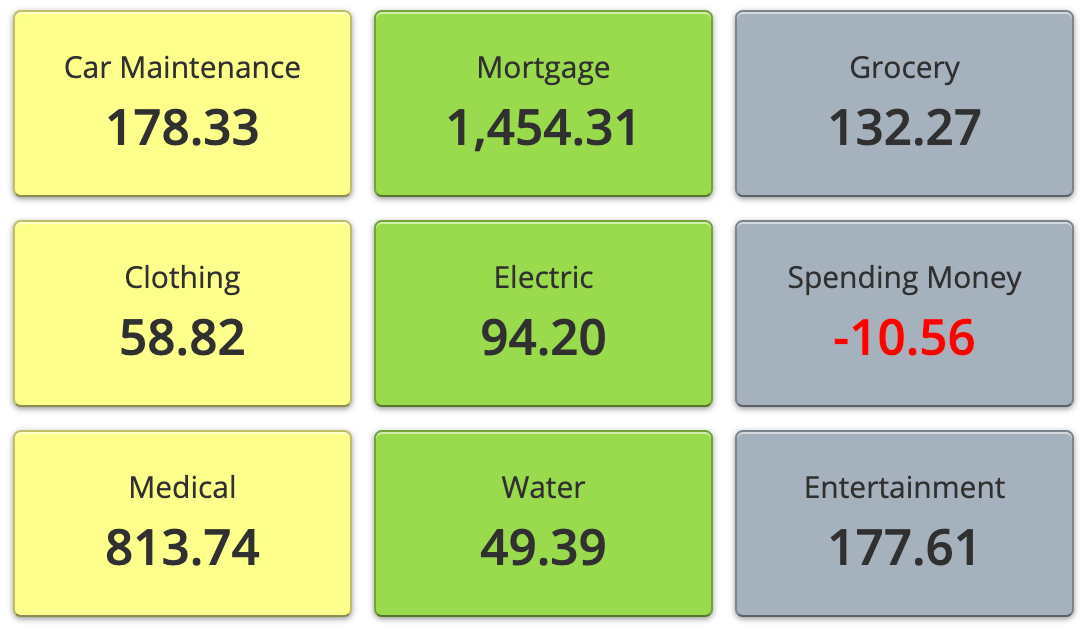
Traditional budgets hide in spreadsheets. NeoBudget puts your budget front and center with colorful envelope cards. See immediately which categories are healthy and which need attention.
No pressure to commit. Try NeoBudget free and upgrade only if it works for you.

"I have used other programs and they were okay but didn't clearly allow me to see what budget categories were negative. NeoBudget tells me right on the homepage with bold red letters if I am negative in any envelope. It's so visual that I actually want to check it."
– Whitney
NeoBudget is built around visual feedback and automation. Instead of numbers in spreadsheets, you see color-coded envelope cards. Instead of manually categorizing every transaction, the app remembers your patterns. The interface is simple and focused, reducing the cognitive load that makes budgeting exhausting.
No. NeoBudget is designed to be forgiving. If you forget to log something, bank sync catches it. If you skip a few days, the visual dashboard gets you back up to speed quickly. The envelope system is flexible - you can adjust and move money between categories without starting over.
With bank sync enabled, transactions import automatically - no manual entry required. The mobile app sends optional notifications. And when you do open the app, the visual envelope cards immediately show you what needs attention, so you can catch up in minutes rather than hours.
Not at all. Envelope budgeting is actually one of the simplest methods: you decide how much money goes in each "envelope" (category), then spend from those envelopes. When an envelope is empty, you stop spending in that category or move money from another envelope. The visual cards make this intuitive.
Yes. NeoBudget has a free tier that lasts forever - no credit card required, no trial period. You get 1 account and 10 envelopes completely free. Try it for as long as you want and upgrade only if you need more features like bank sync or additional accounts.
Many people with ADHD find visual, low-friction tools much easier to maintain than spreadsheets or complex systems. The color-coded feedback provides instant dopamine hits when you're on track, and the simple interface means checking your budget takes seconds, not minutes. It's designed to be something you want to check, not a chore you avoid.
